
GrizzlyRay Notes Is in Public Beta: Here's How to Try It
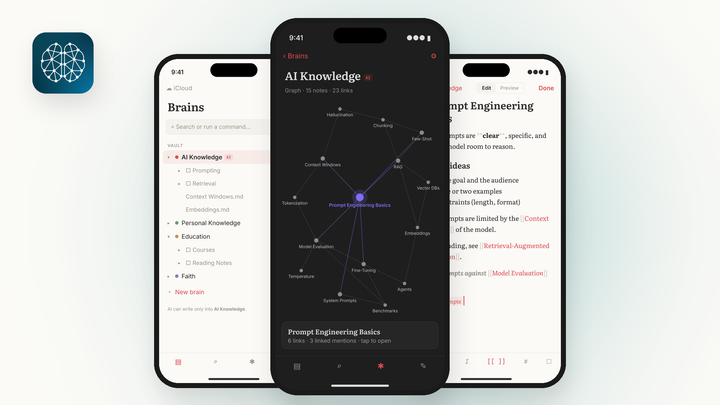
GrizzlyRay Notes is now in public beta on iPhone through TestFlight. Plain Markdown notes in iCloud, [[links]], a graph of your notes, and AI that stays out of your personal notes.

A couple of days ago I introduced GrizzlyRay Notes and said I'd open the beta to readers soon.
It's open. Anyone with an iPhone can try it today through TestFlight:
Join the GrizzlyRay Notes beta
Here's what you're getting, what's still rough, and what I'd love to hear back from you.
What GrizzlyRay Notes Is, in 30 Seconds
It's a notes app built around a few simple ideas:
- Your notes are plain Markdown files in iCloud. They live in the app's own iCloud folder, not locked inside some database. If you ever stop using the app, your notes are still right there.
- Notes link with [[Note Name]]. If you've used Obsidian, you already know how this works. Type two brackets, a note name, and two more brackets, and the notes are connected.
- A graph shows how your notes connect. You can actually see your ideas link up instead of digging through folders.
- Brains, not just folders. Notes are organized into a few top-level "brains," like AI Knowledge and Personal Knowledge, plus whatever areas matter to you. Each brain is its own center in the graph.
And the rule I care about most: AI only ever writes into the AI Knowledge brain. Never into your personal brains. That line doesn't move.
What's in the Beta Right Now
The iPhone app is V1.1, and it made it through Apple's TestFlight review. It has what I need to use it every day:
- A live editor, so you see formatting as you write
- Tables
- Subfolders inside each brain
- Search
- Built-in Help, so you don't have to go hunting for docs
I've been using it myself. It's still early, but it's real, and it's mine. Now I want to know if it works for you too.
The Mac Version Is Coming
I built the Mac version on October 19 with Grok Build, and I wrote up how that compared to building the iPhone app with Cursor.
It's a real Mac app, not a stretched iPad app. It has a sidebar of your brains, a note list, a backlinks panel, a local graph that shows the open note's neighbors, a Command-K quick switcher, and hover previews on links. It uses the same iCloud folder, so a note you write on the Mac shows up on your iPhone.
It's not in the beta yet. I want the iPhone and Mac versions lined up and released together, so I'm finishing my own testing first. When it's ready, beta testers will be the first to get it.
What I Need From Beta Testers
I'm not looking for perfect bug reports. I'm looking for honest ones.
- Tell me what confused you. If you had to stop and think, that's on me, not you.
- Tell me what broke. A screenshot and one sentence about what you were doing is plenty.
- Tell me what's missing. What would make you switch from the notes app you use now?
You can send feedback right from TestFlight. Take a screenshot while you're in the app and TestFlight will offer to send it to me with a note. You can also just reply to my newsletter or find me on X at @GrizzlyRay.
The takeaway: GrizzlyRay Notes is in public beta on iPhone through TestFlight. Your notes are plain Markdown files in your own iCloud, they link with [[Note Name]], and AI never touches your personal notes. The Mac version is close behind. If you try it, tell me what confused you, what broke, and what's missing.
How to Join
- Install Apple's free TestFlight app from the App Store.
- Open the beta link on your iPhone: testflight.apple.com/join/kDr2RD5f
- Tap Accept, then Install.
That's it. Beta builds expire after a while, and TestFlight will let you know when there's a new one.
Here's my question: what's the one thing you'd want a notes app to do that yours doesn't?


Comments ()