
Meet GrizzlyRay Notes: The Notes App I'm Building for Myself (and Maybe You)
GrizzlyRay Notes is an iOS notes app built on plain Markdown files in iCloud, linked notes, and one firm rule: AI only writes where it's allowed.
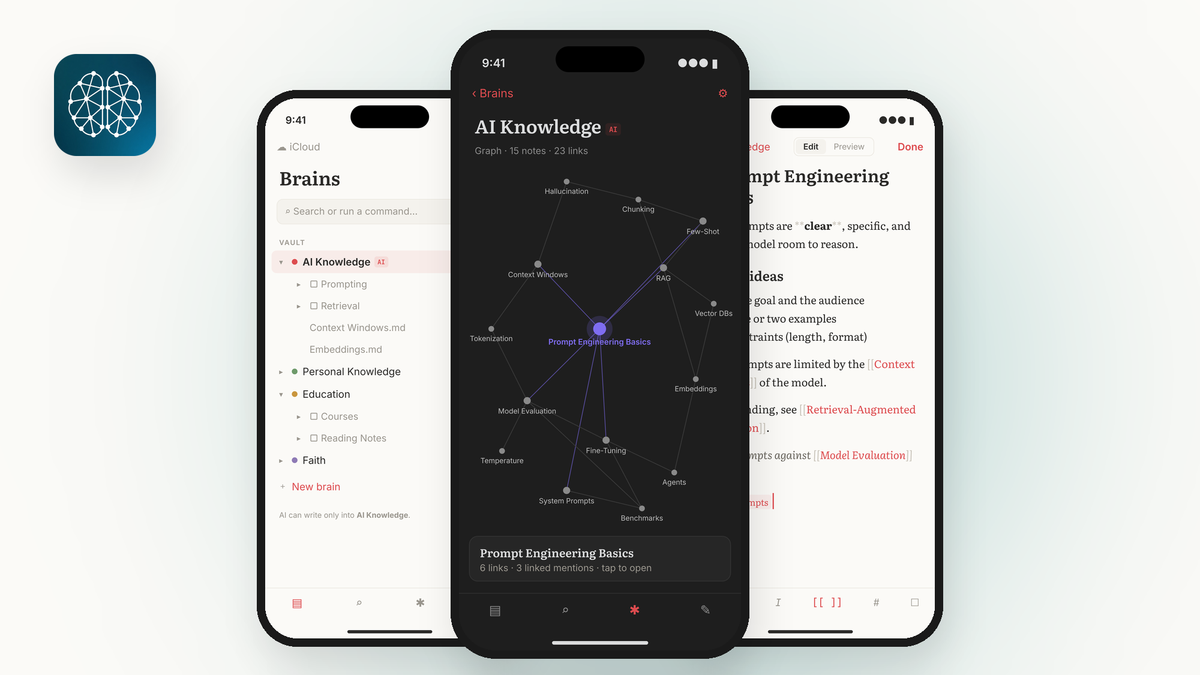
I've tried a lot of notes apps. Most of them are good at something. Very few of them feel like mine.
Last week, I started building one. It's called GrizzlyRay Notes, it's an iOS app, and V1.1 was just approved for beta testing in TestFlight.
Here's what it is, why I'm building it, and how it's going.
Why Build Another Notes App?
Fair question. There are plenty of them.
Three things kept bugging me.
My notes should be my files. A lot of apps keep your notes inside their own system. If the app changes, raises its price, or goes away, getting your stuff out can be a pain. I wanted plain files I can open anywhere.
Notes should connect. The way I think isn't a stack of folders. One idea leads to another. I wanted links between notes and a way to actually see those connections.
AI needs a fence. I use AI tools every day. I like what they can do. But I don't want an AI quietly rewriting my personal notes. I wanted a clear line between what I write and what AI is allowed to touch.
None of the apps I tried got all three right for me. So I'm building the one that does.
How It Works
Plain Markdown, in Your iCloud
Every note is a plain Markdown file stored in the app's own iCloud folder. They're your files, not locked inside an app. If you ever stop using GrizzlyRay Notes, your notes are still right there.
Links With [[Note Name]]
If you've used Obsidian, this will feel familiar. Type [[Note Name]] and you've linked two notes. Simple, fast, and it works the way people already expect.
Brains, Not Just Folders
Notes are organized into 3 to 7 top-level "brains." Think of each one as a big area of your life or work.
Two of them are permanent core brains:
- AI Knowledge
- Personal Knowledge
You can add others for the areas that matter to you.
Each brain is its own center in a visual graph of your linked notes. So instead of one giant tangled web, you see clusters that make sense.
The Core Rule
This is the one I care about most.
AI may only ever write into the AI Knowledge brain. Never into personal brains.
Your personal notes stay yours. If AI helps you research something or build out a reference, that lands in AI Knowledge, where it's clearly labeled as AI territory. Nothing crosses that line.
I think that's how AI should work in a tool like this. It helps. It doesn't take over.
What's in V1.1
V1.1 adds the features I needed to use it every day:
- Live editor, so you see your formatting as you write
- Tables
- Subfolders inside each brain
- Search
- Built-in Help, so you don't need to hunt for docs
The Build Story So Far
I'm not a full-time iOS developer. This is my first real iOS app.
I'm building it in Cursor, and I use AI tools like Grok heavily in the process. That's not something I hide. It's the whole point of a lot of what I write about here: using AI as a practical tool to build real things.
So far:
- Two complete builds
- 148 automated tests passing
- V1.1 approved for TestFlight beta testing
A few habits have made a big difference, both in quality and in keeping my AI usage reasonable:
- I stick to the included models. For the big steps, I pick Grok 4.7 by hand.
- I start a fresh chat when the context gets big. One chat for days gets slow and confused.
- I do one build step per prompt. Small steps are easier to test, easier to fix, and easier to trust.
The tests matter more than people think. When AI writes code, you need a fast way to know if something broke. 148 tests passing means every change gets checked before I move on.
What Might Come Later
This part is a maybe, not a promise.
One idea I keep coming back to is letting you connect your own Grok subscription for AI features inside the app. Paired with some simple guidance, that could help less technical people set up a notes system that actually works for them, without needing to figure it all out alone.
The core rule would still apply. AI writes into AI Knowledge only.
I'll share more if and when it's real.
Want to Try the Beta?
GrizzlyRay Notes is still early, and I'm looking for a few people who'd like to try it and tell me what's working and what isn't.
If that sounds like you, subscribe or just reply and let me know. I'll open the beta to readers in the next few days.
Here's my question: what's the one thing your current notes app gets wrong?



Comments ()